

Bumpwise user guide
Bumpwise compares your code with the last published release of your library and tells you, while you type, which changes would break the people who depend on it.
Install
- In IntelliJ IDEA (2026.3 or later), open Settings | Plugins | Marketplace.
- Search for Bumpwise, click Install and restart the IDE if asked.
- Open a library project. Bumpwise finds Maven and Gradle modules,
package.json,go.mod,composer.jsonandCargo.tomlon its own.
The Free edition works immediately for Java libraries on Maven Central. To try everything else, start the 30-day Bumpwise Team trial from Help | Register or from any “Try Bumpwise Team” link in the IDE.
Quick start
- Open a source file of a library that already has a published release.
- Change a public method, for example add a parameter. After a moment its name is underlined.
- Hover it to read what breaks, then press Alt+Enter to keep the change compatible or to bump the version.
- Run Tools | Check API Compatibility to see every change, the next version and a changelog draft.
Bumpwise downloads the published release once, in the background, and caches it. Until it is available, nothing is highlighted.
Warnings while you type
The inspection compares the file you are editing with the published release. It reads your source code, so it needs no build. Each warning tells you what changed, which release it breaks and which version the change requires.

What counts as breaking depends on the language. Typical examples:
- Removed or renamed public types, methods, fields, functions and exports.
- Changed parameter or return types, and new required parameters.
- Reduced visibility, and
finalorsealedadded to something users extend. - New abstract methods in interfaces and traits that users implement.
- Kotlin: renamed parameters (named arguments), removed default values, and parameters that no longer accept
null. - Changed constant values and new enum variants are reported as weaker warnings: they compile, but they can change behavior.
Quick fixes
| Change | Quick fix |
|---|---|
| Method removed or its signature changed | Keep as @Deprecated: brings the old method back, delegating to the new one when possible. |
| New abstract method in an interface | Make it a default method TEAM |
final added | Remove final TEAM |
| Visibility reduced | Restore the published visibility TEAM |
| Kotlin parameter renamed or made non-null | Rename it back or Make it nullable again TEAM |
| Any breaking change | Bump the version (see below) |
Test sources are never checked, and files with unresolved types are skipped until they resolve, so you do not get false alarms while the project is still loading.
Bump the version
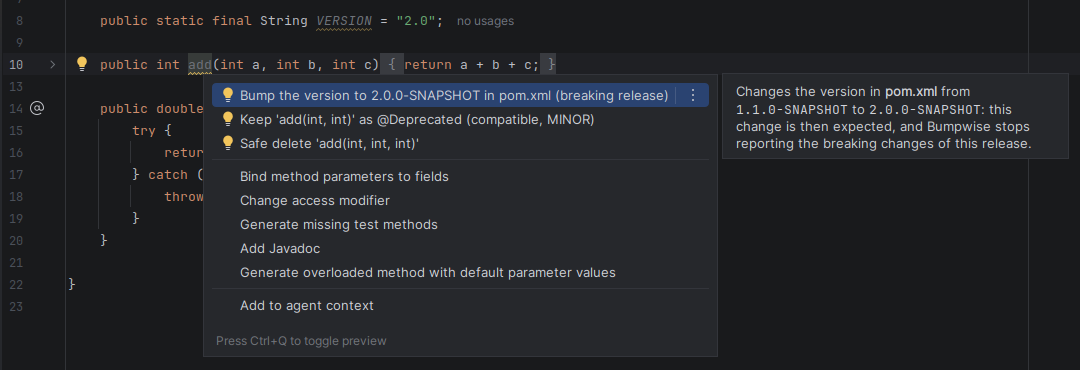
Sometimes breaking the API is the right call. In that case, choose Bump the version to X from Alt+Enter. Bumpwise writes the next major version in the file where the version lives:
- Maven: the project
<version>ofpom.xml, or the property it uses (such as${revision}). - Gradle:
version = "…"inbuild.gradle(.kts), orversion=…ingradle.properties. - npm:
package.json. Rust: the[package]table ofCargo.toml.
Your format is kept: 1.1.0-SNAPSHOT becomes 2.0.0-SNAPSHOT, v1.4 becomes v2.0. Once the declared version is the next major, the breaking changes of that release are intended, so the editor stops highlighting them. The full check still lists them for the changelog.
Full check and changelog
Tools | Check API Compatibility checks the whole library and opens the Bumpwise tool window with:
- the published version, the required release level (MAJOR, MINOR or PATCH) and the next version;
- a warning when the declared version is lower than the changes require;
- every change with its impact and the compatible alternative (double-click to jump to the code);
- an editable changelog draft, with Copy changelog, Copy PR summary and Save SARIF….

For Java and Kotlin, the full check compares compiled classes, exactly like your users' compiler sees them, so build the project first (Build | Build Project or your Maven/Gradle build). The other languages are read from source.
Before commit
When you commit, Bumpwise checks the libraries the commit touches. If one of them breaks its published API and its version was not bumped, it reacts according to Settings | Tools | Bumpwise | General | Before commit:
| Option | What happens |
|---|---|
| Warn and ask before committing (default) | A dialog lists the problems; choose Commit Anyway or Cancel. |
| Block the commit | The commit is refused until the change is compatible, the version is bumped, or the change is accepted in .bumpwise.yml. |
| Don't check | Nothing runs at commit time. |
A network problem never blocks a commit. Go and PHP are not blocked because their versions are git tags, and a declared version Bumpwise cannot read (for example latest) never blocks either. This check runs in the IDE only: mvn or gradle in a terminal or in CI are not affected.

Languages and builds
| Language | Project | Published release from |
|---|---|---|
| Java | Maven (pom.xml) or Gradle | Maven Central, Nexus, Artifactory, GitHub Packages |
| Kotlin TEAM | Maven or Gradle | Same as Java |
| TypeScript / JavaScript TEAM | package.json | npm registry (the .d.ts files of the package) |
| Go TEAM | go.mod | Go module proxy |
| PHP TEAM | composer.json | Packagist |
| Rust TEAM | Cargo.toml | crates.io |
Gradle
Gradle modules are recognized from the Gradle model IntelliJ imported: the publication's coordinates when there is one, otherwise group, project name and version. A project without a group is skipped. To override the coordinates, or for other build tools, map the module in Settings | Tools | Bumpwise | General | Library coordinates, one per line: my-lib=com.example:my-lib.
Private repositories TEAM
Set the repository in Settings | Tools | Bumpwise | Java / Kotlin. Bumpwise lists the mirrors and active repositories of your ~/.m2/settings.xml, so one click on Use picks the right URL.
With Use the credentials from Maven's settings.xml (on by default), the <server> whose id matches that mirror or repository supplies the credentials. Supported:
- username and password, including passwords encrypted with
mvn --encrypt-password(the master password is read from~/.m2/settings-security.xml); ${env.VARIABLE}values;- an
Authorizationheader, for exampleBearer …for Artifactory or Nexus tokens.
When settings.xml has nothing for the URL, the username and password typed in Bumpwise are used. Leave the username empty to send the password as a Bearer token. Secrets are stored in the IDE password safe, never in project files.

For npm, Go, Packagist and crates.io, set the registry URL and, for private registries, a token in their own tabs.
Version formats
Bumpwise calculates versions as MAJOR.MINOR.PATCH and accepts the usual variations: a v prefix, two components (2.1), and any suffix (-SNAPSHOT, .Final, -rc1, -v2). For 0.x versions, a breaking change bumps MINOR, as Cargo and npm do.
If a library's versions are not numbers (such as release-42), every change and its impact are still reported, just without a version to suggest. For schemes that look like numbers but are not semantic (build numbers, dates), turn off This project uses semantic versioning: no version is suggested or checked, and the before-commit check follows failOn alone.
Team policy TEAM
Commit a .bumpwise.yml to share rules with your team. Bumpwise uses the nearest file above each library, so a monorepo can have one shared file and per-library overrides.
# .bumpwise.yml
exclude:                      # not part of the public API
  - com.acme.internal
  - "**.impl"
accept:                       # intended changes, with the reason
  - element: com.acme.Client#connect(String)
    reason: replaced by connect(URI), announced in 2.3
failOn: breaking              # breaking (default), minor or never
A name also covers everything inside it (com.acme.internal excludes the whole package); * matches within one name segment and ** matches anything. An accepted change needs only a MINOR release and appears in its own section of the changelog. A file with a mistake is ignored, with a notification that says why.
Pull requests and CI TEAM
From the Bumpwise tool window:
- Copy PR summary copies a Markdown summary (verdict, next version, breaking and accepted changes, changelog) ready to paste in a pull request.
- Save SARIF… writes a SARIF 2.1.0 report that GitHub code scanning and most CI tools can display.
AI agents (MCP) TEAM
Bumpwise adds a check_api_compatibility tool to the IDE's built-in MCP server, so coding agents can ask whether their change breaks the API of the code open in the IDE.
- Open Settings | Tools | MCP Server, enable it, and use Auto-configure for your AI client.
- Ask the agent, for example: “Check whether my changes break the API of this library.”
Settings reference
Everything lives in Settings | Tools | Bumpwise, per project.
| Tab | Setting | Default |
|---|---|---|
| General | This project uses semantic versioning | On |
| General | Stop reporting breaking changes once the version is bumped | On |
| General | Before commit | Warn and ask |
| General | Library coordinates (modules without pom.xml) | Empty |
| Java / Kotlin | Repository URL | Maven Central |
| Java / Kotlin | Use the credentials from Maven's settings.xml | On |
| Java / Kotlin | Username, password / token | Empty |
| TypeScript / JS, Go, PHP, Rust | Registry URL and token | Public registry |
Editions and licensing
| Free | Team | |
|---|---|---|
| Java on Maven Central | ✓ | ✓ |
| Keep as @Deprecated, Bump the version, before commit | ✓ | ✓ |
| Kotlin, TypeScript/JavaScript, Go, PHP, Rust | ✓ | |
| Private repositories and registries | ✓ | |
| All quick fixes | ✓ | |
| Team policy, PR summary, SARIF, MCP tool | ✓ |
Bumpwise Team is licensed per user through the JetBrains Marketplace, with a 30-day free trial. Licenses are managed in Help | Register, like any JetBrains product.
FAQ
Nothing is highlighted. Why?
Check that the library has a published release in the configured repository, that the file is in a main (not test) source folder, and that the code compiles. The first download of the published release can take a few seconds.
Does Bumpwise send my code anywhere?
No. Analysis runs in your IDE. Bumpwise only downloads published releases from the repositories and registries you configure. See the privacy policy.
Can it fail my Maven or Gradle build?
Not today: Bumpwise runs in the IDE. Use the before-commit check, and the PR summary or SARIF report for reviews.
My versions don't follow semantic versioning.
See Version formats. Changes are still reported; only version suggestions are turned off.
How do I report a problem?
Write to hello@gilware.com with your IDE version (Help | About) and, if possible, a small example.